Free Chrome extension for AI chats

Export, delete and organise ChatGPT chats in one free extension.

AI Chat Tools adds the tools ChatGPT is missing: one-click PDF and Markdown export, bulk delete, folders, full-text search, and moving a chat to Claude or Gemini. It works the same on Claude, Gemini and Grok.

Coming soon to ChromeSee what it does
  • Free, no account
  • Chats stay on your device
  • ChatGPT, Claude, Gemini, Grok
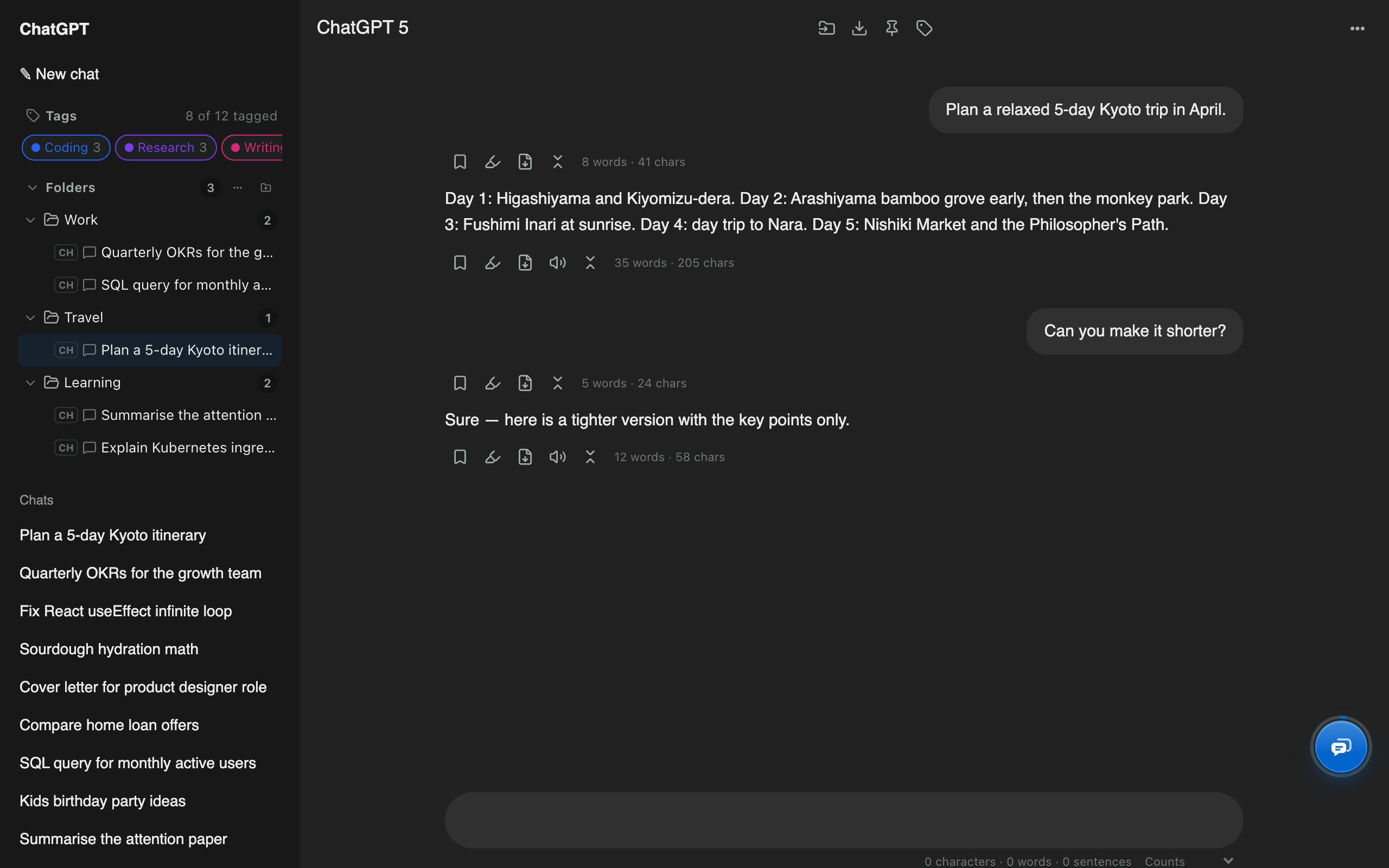
ChatGPT with AI Chat Tools folders, tags and message tools added to the page

Real screenshot. Folders, tags and message tools sit inside ChatGPT's own page.

Works insideChatGPTClaudeGeminiGrokGrok on X

What it does

Everything ChatGPT is missing for managing chats

Five tools people usually install separately, in one extension that sits inside the page you already use.

ChatGPT exporter

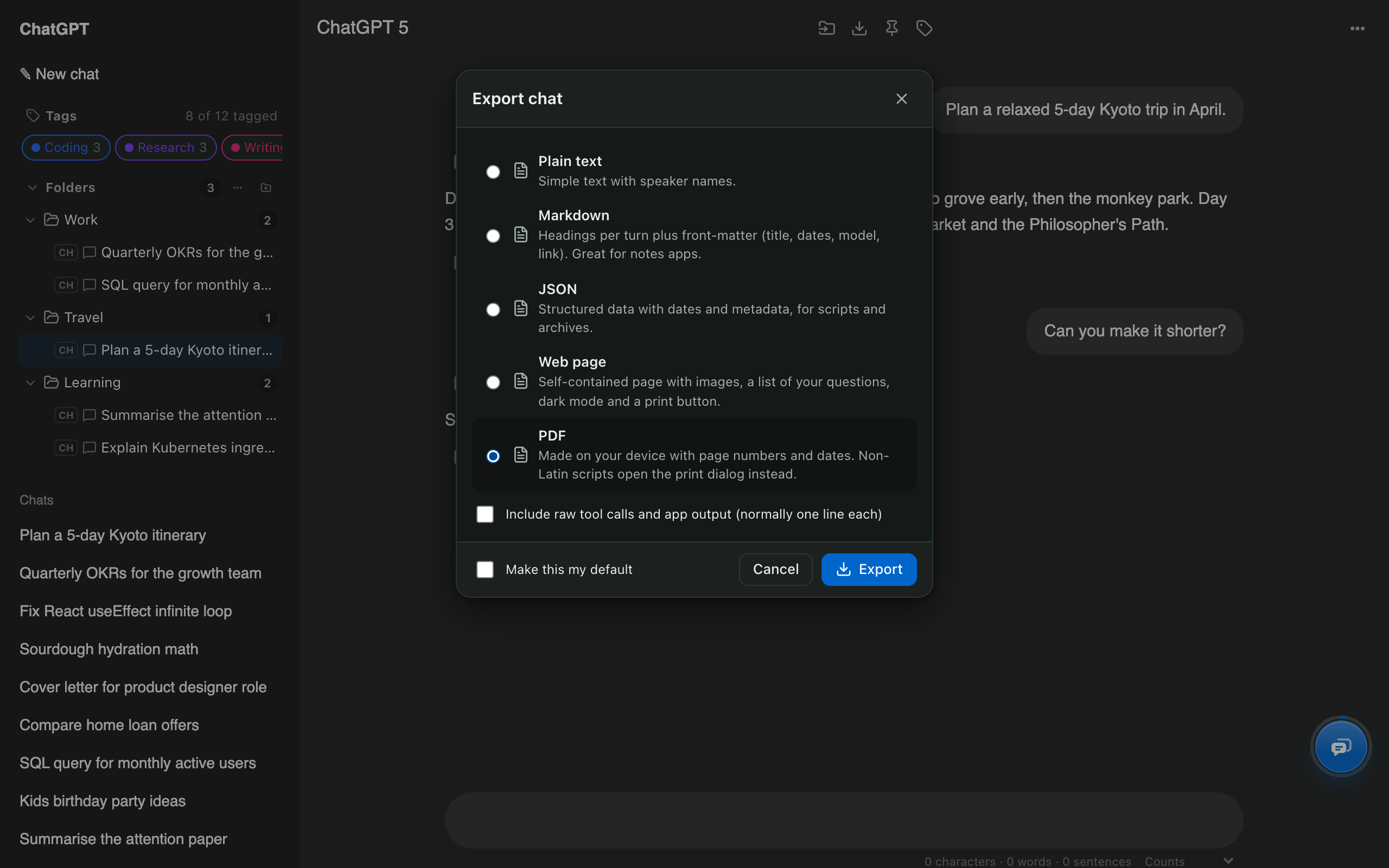
Export ChatGPT chats to PDF, Markdown and more.

Save the chat you're reading in one click, or select dozens of chats and download them as one ZIP that mirrors your folders. Every file is built inside your browser.

  • PDF, Markdown, text, JSON and web page
  • Bulk export as a ZIP that mirrors your folders
  • ₹, € and emoji print correctly
More about ChatGPT exporter →
AI Chat Tools export dialog on ChatGPT with PDF, Markdown, JSON, web page and plain text formats

ChatGPT bulk delete

Bulk delete ChatGPT chats and keep the ones that matter.

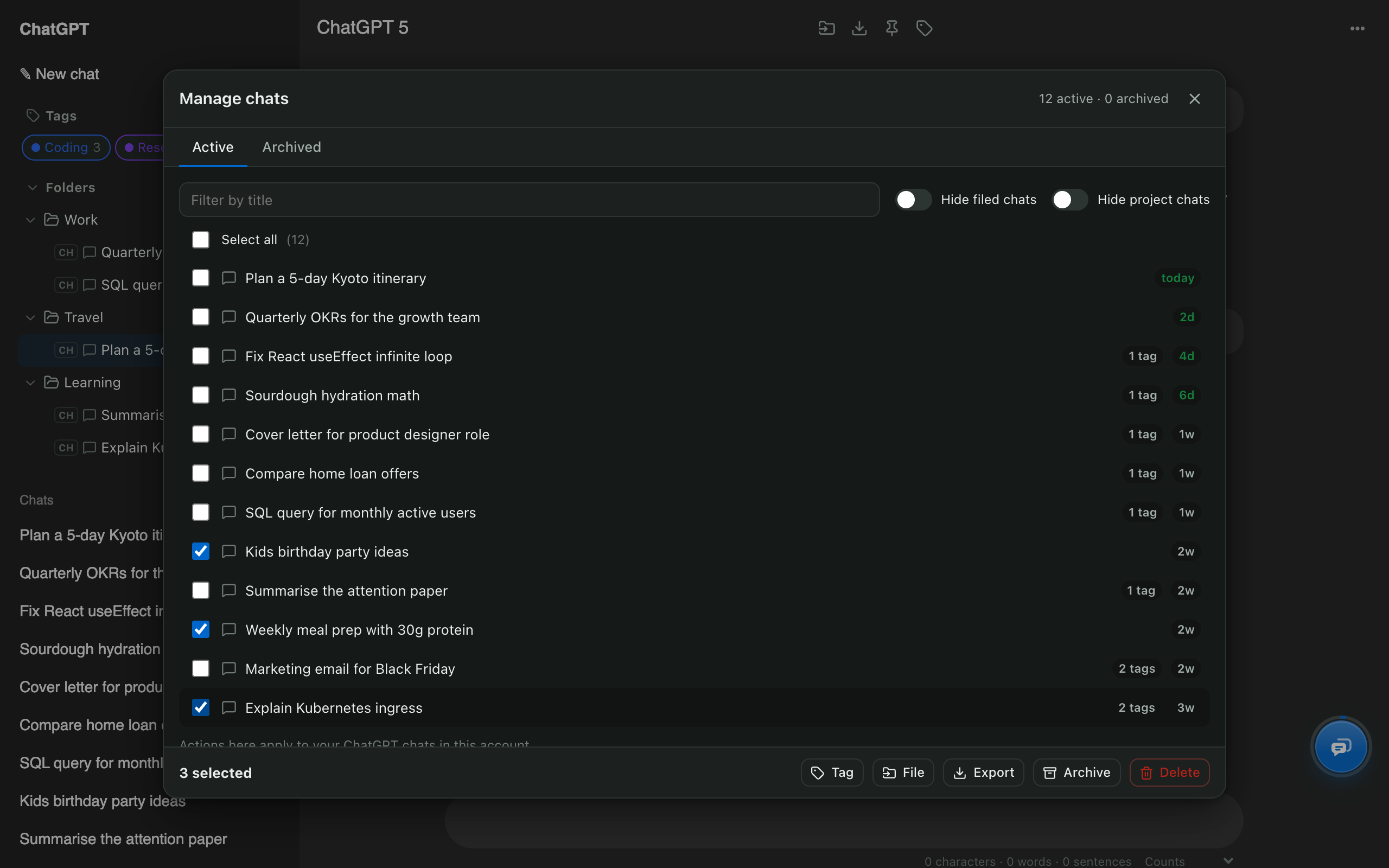
Tick the chats you want gone, or select all, then delete or archive them in one step. Chats in your folders can be protected, and every deleted chat is kept privately on your device for 30 days.

  • Select any number of chats, or all
  • Protect chats that are in folders
  • Private 30-day copy of everything you delete
More about ChatGPT bulk delete →
Manage chats window with three ChatGPT chats selected and Delete and Archive buttons

ChatGPT folders

Folders for ChatGPT, right in the sidebar.

Nested folders appear inside ChatGPT's own sidebar. Drag a chat onto a folder to file it, pin the chats you use daily, and hide everything you've already filed.

  • Nested folders inside ChatGPT’s sidebar
  • Drag and drop, pins and tags
  • Mix ChatGPT, Claude, Gemini and Grok chats
More about ChatGPT folders →
ChatGPT sidebar with Work, Travel and Learning folders added by AI Chat Tools

Search ChatGPT history

Search every ChatGPT message, not just the titles.

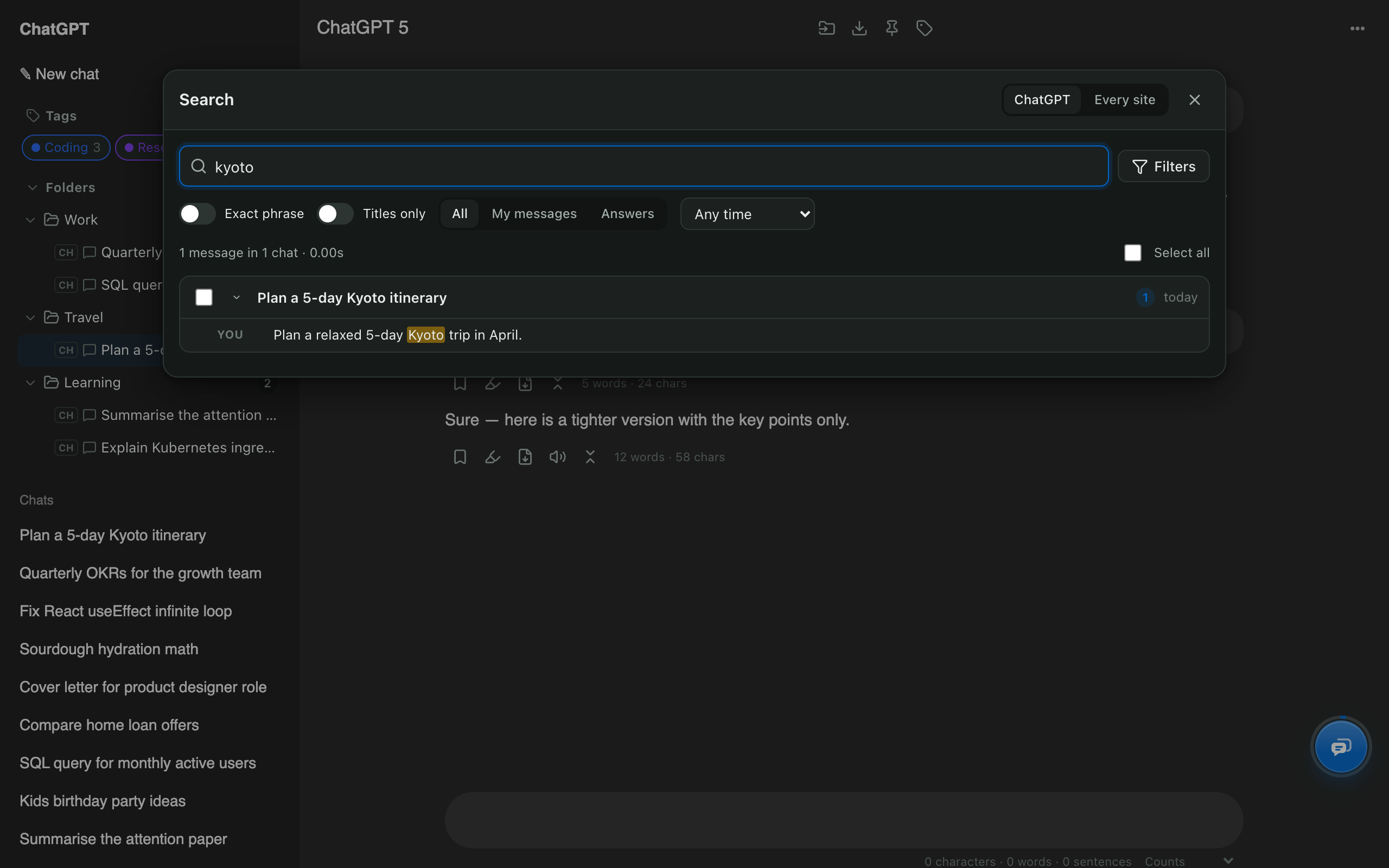
AI Chat Tools indexes the full text of your chats inside your browser, so you can find that answer from months ago, filter by date, and jump straight to the message.

  • Every message, not just titles
  • Date, speaker and exact-phrase filters
  • Jump straight to the matching message
More about Search chat history →
AI Chat Tools search window with a highlighted match in a ChatGPT conversation

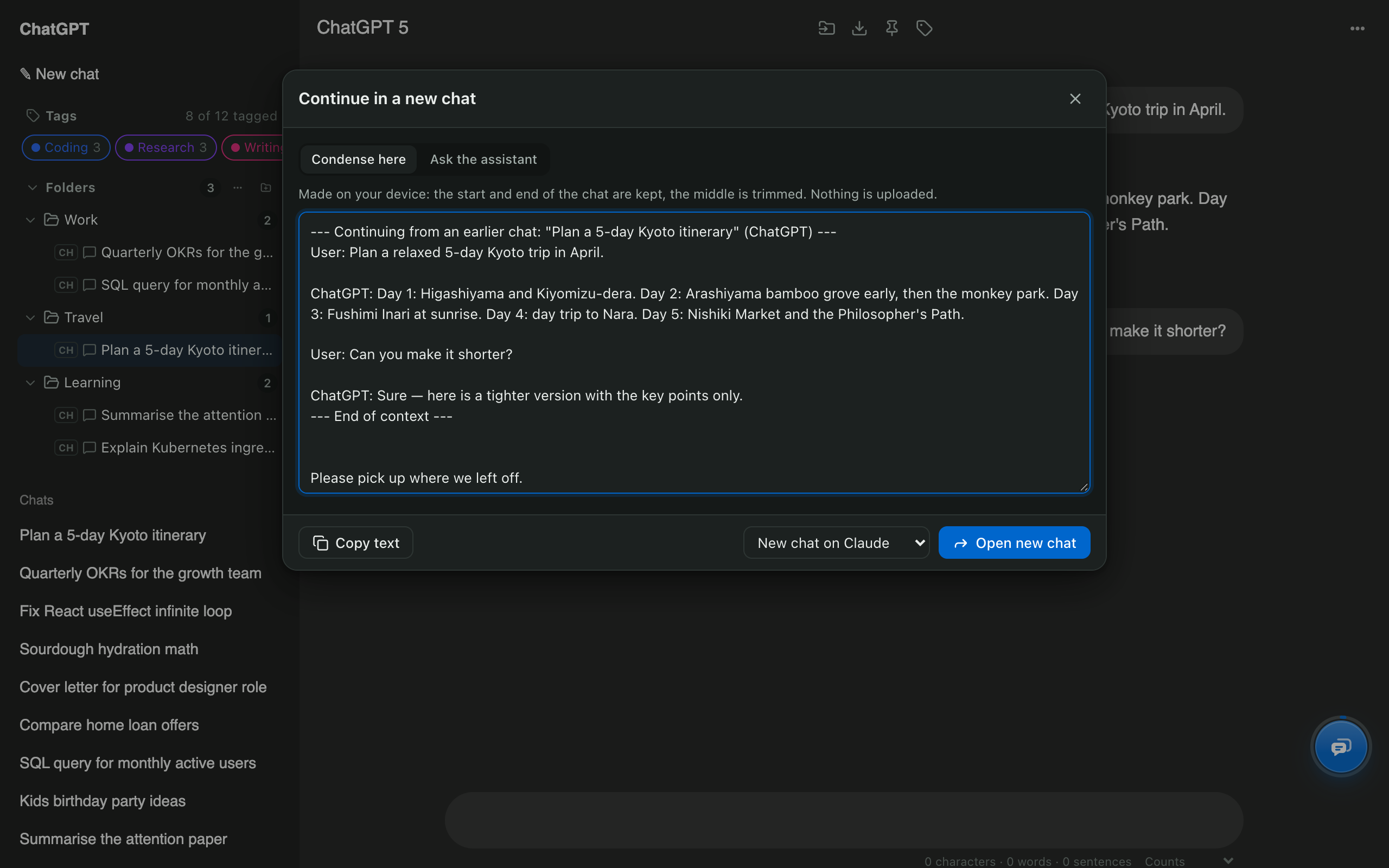
ChatGPT to Claude

Move a ChatGPT chat to Claude without losing the context.

Carry a conversation to Claude, Gemini or Grok in two clicks. The context is condensed on your device and placed in the new chat's message box, ready for your next question.

  • Continue on Claude, Gemini or Grok
  • Condensed on your device
  • You review the text before sending
More about ChatGPT to Claude →
Continue in a new chat window with the condensed ChatGPT conversation and Claude as the destination

Compared

ChatGPT on its own vs with AI Chat Tools

TaskChatGPT on its ownWith AI Chat Tools
Export one chat to PDFPrint the pageOne click
Delete 50 chats50 × ⋯ → DeleteSelect, delete once
Nested foldersProjects onlyYes
Search by dateNoYes
Continue a chat in ClaudeCopy and pasteTwo clicks
Same tools on Claude and GeminiNoYes

Private by design

Your chats never leave your device

No account, no AI Chat Tools server holding your conversations, no analytics. The search index, folders and every export are made inside your browser. Read the privacy policy.

Questions about AI Chat Tools

What is AI Chat Tools?

AI Chat Tools is a free Chrome extension that exports ChatGPT chats to PDF and Markdown, bulk deletes old chats, adds folders and full-text search, and moves conversations to Claude or Gemini. Your chats stay on your device.

Is AI Chat Tools free?

Yes. Folders, search, export, bulk delete, moving chats between assistants and the prompt library are free during early access, with no account and no card.

Do my chats leave my computer?

No. Chats, folders and the search index are stored in your browser. There is no AI Chat Tools server, no analytics and no tracking; each site’s sign-in is only ever sent back to that same site.

Which AI sites does it work on?

ChatGPT and Claude out of the box. Gemini and Grok (including Grok on X) are switched on from the toolbar button.

Which browsers are supported?

Chrome, Edge, Brave, Arc and other Chromium browsers that install extensions from the Chrome Web Store.

Free Chrome extension

Your AI chats, finally organised

Folders, export, bulk delete and search for ChatGPT, Claude, Gemini and Grok. Free, and your chats never leave your device.

Coming soon to ChromeRead the guides