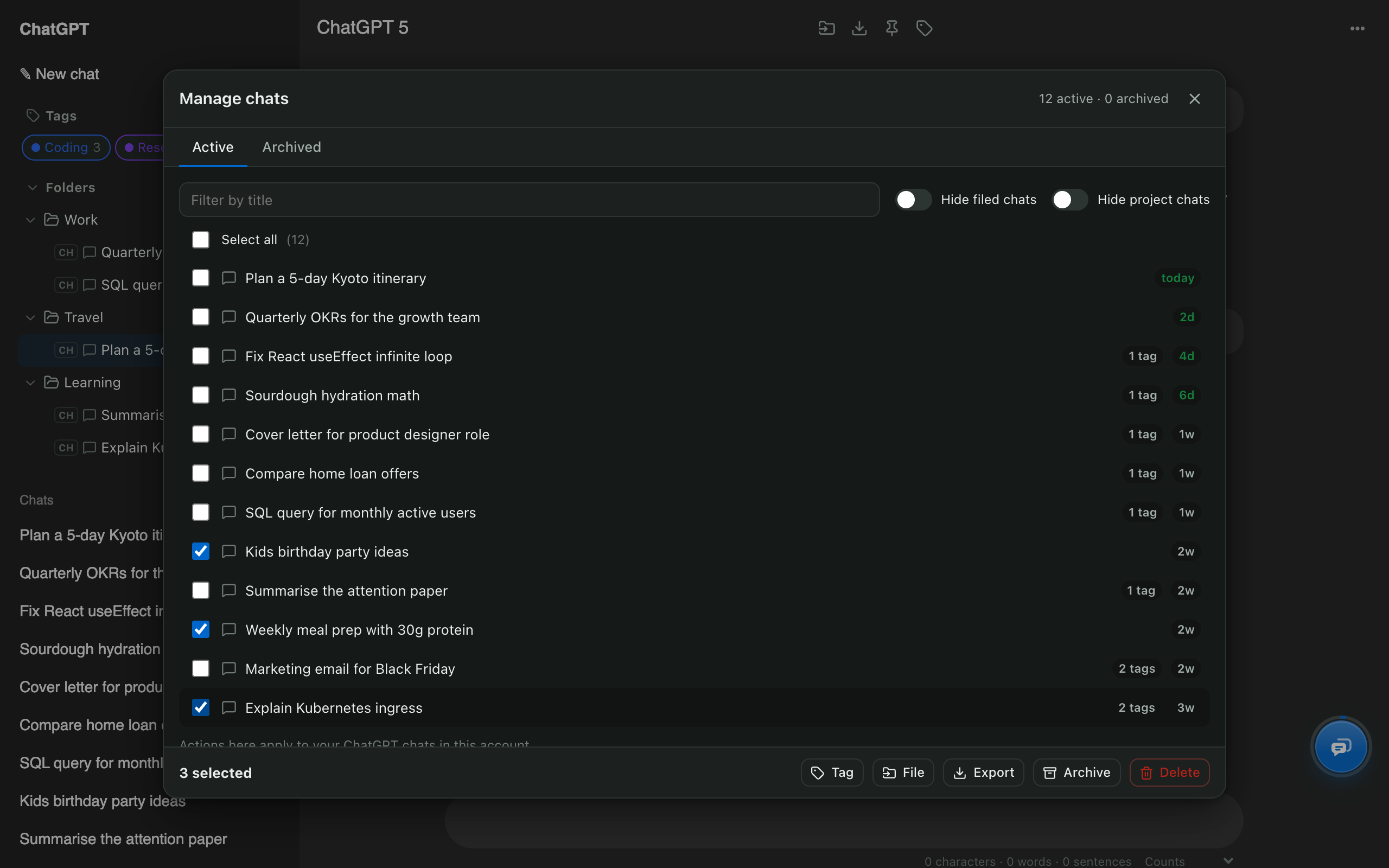
ChatGPT bulk delete

Bulk delete ChatGPT chats and keep the ones that matter.

Tick the chats you want gone, or select all, then delete or archive them in one step. Chats in your folders can be protected, and every deleted chat is kept privately on your device for 30 days.

Chrome: coming soonFirefox: coming soonEdge: coming soon
Read the step-by-step guide
  • Free
  • Made on your device
  • ChatGPT, Claude, Gemini, Grok
Manage chats window with three ChatGPT chats selected and Delete and Archive buttons

ChatGPT bulk delete: quick facts

SelectionPick individual chats, filter by title, or select all
ActionsDelete, archive, unarchive, export, tag, file into a folder
LimitNone. Select as many chats as you like
Safety netConfirmation step plus a private 30-day copy of deleted chats
Works onChatGPT, Claude, Gemini and Grok
PriceFree

How to use it

  1. Press Ctrl/⌘ + K on chatgpt.com and open Manage chats.
  2. Filter by title, or switch on Hide filed chats to protect everything in a folder.
  3. Tick the chats, or use Select all.
  4. Press Delete (or Archive) and confirm.

ChatGPT on its own vs AI Chat Tools

Deleting chats: ChatGPT on its own vs with AI Chat Tools
TaskChatGPT on its ownAI Chat Tools
Delete one chatYes, from the ⋯ menuYes
Delete a chosen set of chatsNoYes, any number
Delete everythingYes, a single Delete all chats optionYes, or everything except chats in folders
Archive in bulk and restoreArchive all onlyYes, both directions
Undo a mistakeNoPrivate 30-day copy on your device

Why bulk delete ChatGPT chats?

A long chat list slows you down and buries the conversations you return to. Bulk delete clears the noise in seconds while folders keep the chats worth keeping.

What happens when I delete chats?

Chats are deleted on ChatGPT itself, exactly as if you used its own Delete button, after you confirm. AI Chat Tools also stores a private copy of each deleted chat in your browser for 30 days, so a mistake isn’t permanent. You can turn that off on shared computers.

Should I archive or delete?

Archive when you might need a chat again: it leaves the sidebar but stays in your account. Delete when it should be gone. Not sure? Export the chats first, then delete.

Does it work on Claude, Gemini and Grok?

Yes. Manage chats works the same way on every supported site.

ChatGPT bulk delete: common questions

How do I delete multiple chats in ChatGPT at once?

ChatGPT has no multi-select. With AI Chat Tools, open Manage chats, tick the chats (or Select all) and press Delete. Deleting happens on ChatGPT itself, after a confirmation step.

Can I undo a bulk delete?

ChatGPT cannot restore deleted chats. AI Chat Tools keeps a private copy of each chat you delete through it for 30 days by default, under Settings → Data → Recently deleted.

Is archiving safer than deleting?

Yes. Archived chats leave your sidebar but stay in your account, and the Archived tab in Manage chats restores them in bulk.

Will it delete chats that are in my folders?

Only if you select them. Turn on Hide filed chats in Manage chats and Select all skips everything you've organised.

Free for Chrome, Firefox & Edge

Your AI chats, finally organised

Folders, export, bulk delete and search for ChatGPT, Claude, Gemini and Grok. Free, and your chats never leave your device.

Chrome: coming soonFirefox: coming soonEdge: coming soon
Read the guides