ChatGPT to Claude

Move a ChatGPT chat to Claude without losing the context.

Carry a conversation to Claude, Gemini or Grok in two clicks. The context is condensed on your device and placed in the new chat's message box, ready for your next question.

Chrome: coming soonFirefox: coming soonEdge: coming soon
Read the step-by-step guide
  • Free
  • Made on your device
  • ChatGPT, Claude, Gemini, Grok
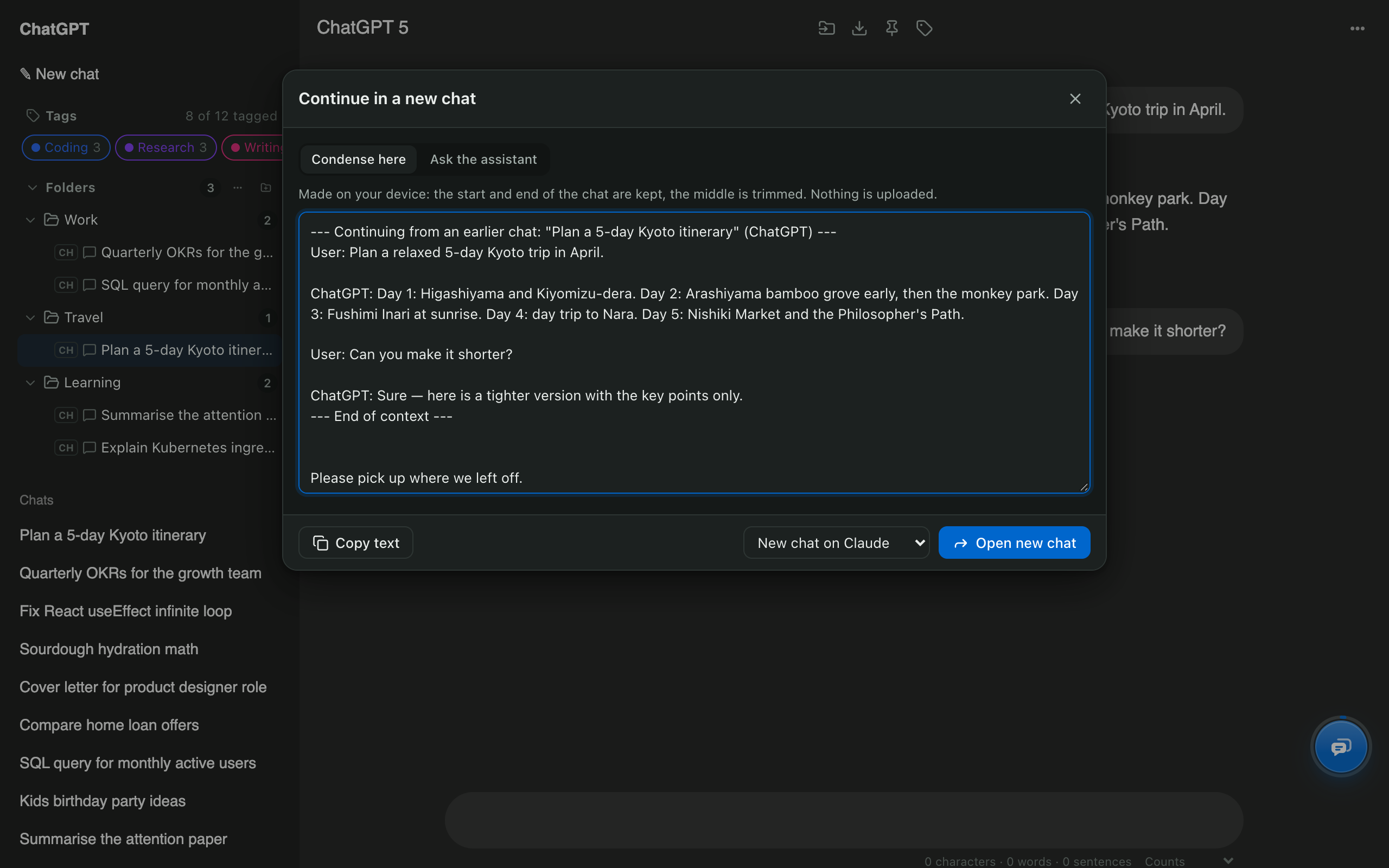
Continue in a new chat window with the condensed ChatGPT conversation and Claude as the destination

ChatGPT to Claude: quick facts

DestinationsClaude, Gemini, Grok, or a fresh ChatGPT chat
DirectionsAny supported site to any other
Context optionsCondense on your device, or ask the assistant for a hand-off summary
What's sentNothing automatically. You review the text and press send
ScopeOne conversation at a time
PriceFree

How to use it

  1. Open the ChatGPT conversation you want to move.
  2. Press Ctrl/⌘ + K and choose Continue in a new chat.
  3. Choose Condense here or Ask the assistant.
  4. Pick New chat on Claude and press Open new chat; the context is waiting in Claude's message box.

Why move a chat to another assistant?

Each assistant has strengths, and long chats eventually hit a context limit. Moving the conversation keeps your progress instead of starting from zero.

What gets carried over?

With Condense here, the opening and the most recent messages are kept and the middle is trimmed, all on your device. With Ask the assistant, the current AI writes a short hand-off: goal, key facts, decisions, open questions and the next step. Either way you see the text before anything is sent.

Can I move all my ChatGPT history to Claude?

Not in one go; Claude has no import for it. Move active conversations with this tool and keep a full archive with the ChatGPT exporter. Walkthrough: how to transfer ChatGPT to Claude.

ChatGPT to Claude: common questions

Can I import my whole ChatGPT history into Claude?

Claude has no import for ChatGPT history. Move the conversations you're still working on one at a time, and keep the rest as Markdown or PDF exports.

Does it copy the entire conversation?

Condense here keeps the start and end of the chat and trims the middle so it fits. Ask the assistant has ChatGPT write a compact summary of goals, facts, decisions and the next step instead.

Does it work from Claude to ChatGPT?

Yes, and between Gemini and Grok too.

Free for Chrome, Firefox & Edge

Your AI chats, finally organised

Folders, export, bulk delete and search for ChatGPT, Claude, Gemini and Grok. Free, and your chats never leave your device.

Chrome: coming soonFirefox: coming soonEdge: coming soon
Read the guides